The problem
After three generations of algorithmic improvement, Finder v13 achieved 7-10% CSS selector dependency & under 2% content failure rates. But that remaining percentage represented genuine edge cases where algorithms hit fundamental limits.
Two problems stood out:
- Weak elements: Steps where the algorithm couldn't generate reliable selectors, even with all our improvements
- Multilingual gaps: Detection faltered when applications switched languages
Some obvious solutions: Throw a general-purpose LLM at everything, invest in a Small Langauge Model(SLM), fine-tune an existing LLM & so on. But that would be expensive, slow, and maybe unnecessary? Instead, we asked: what's the minimum AI intervention needed to solve these specific problems?
Solution 1: AI-generated CSS Selectors
Remember element strength tracking from Case Study 1? That instrumentation provided us our target cohort - weak elements.
For these weak elements, we needed a fallback. Enter LLM-generated CSS selectors.
The initial approach
The concept was straightforward. When the system detected a weak element during authoring, it would asynchronously invoke an LLM to generate a CSS selector. No blocking the author's workflow. The selector gets added in the background.
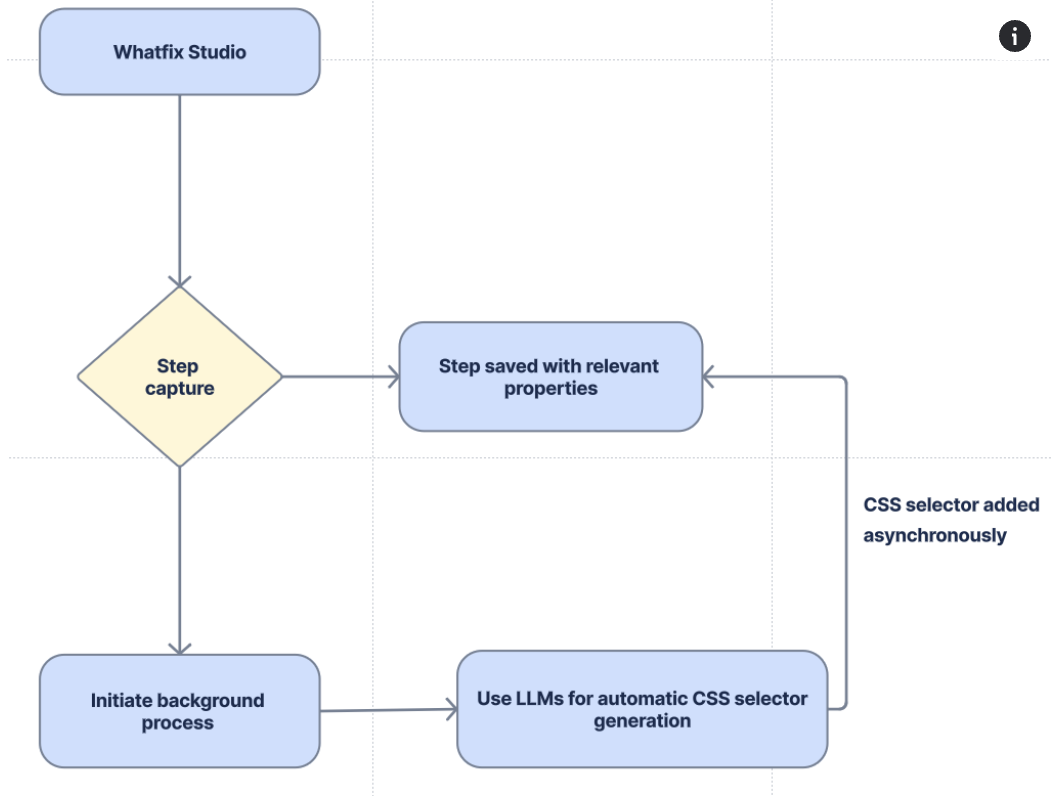
The results were okayish. But we quickly hit a problem: the LLM-generated selectors were often too generic, unreliable or straight up failures. The HTML DOM for many enterprise applications is unreliable, filled with dynamically generated classes and attributes. The LLM, working without context, would generate selectors that technically matched but weren't stable over time.
Refining the approach: Reference data sets
The breakthrough came from a simple question: what if we showed the LLM what good selectors look like for this specific application?
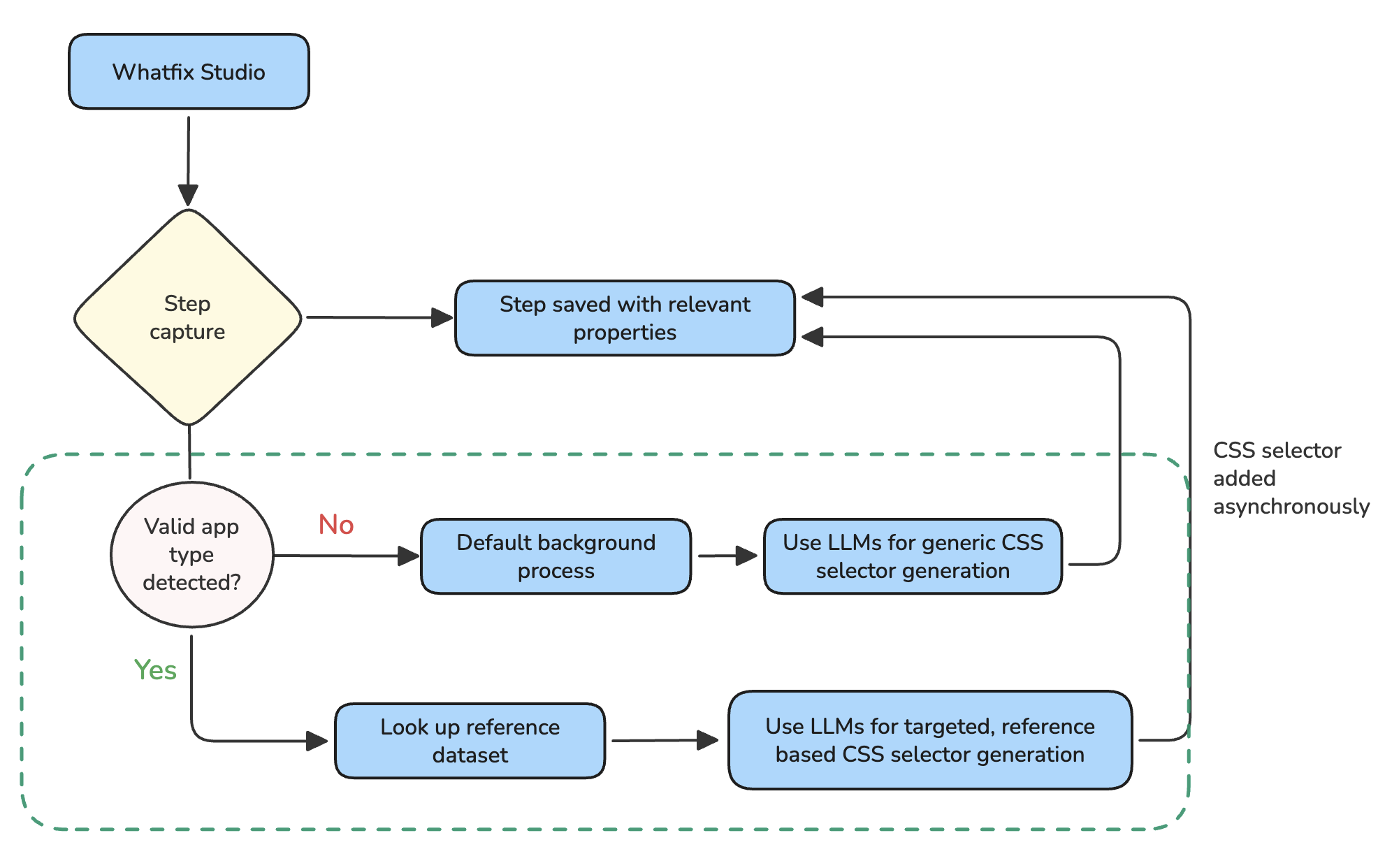
We looked at all the CSS selectors that humans had added for different application types. SAP Ariba selectors varied from Salesforce selectors, which in turn varied from MS Dynamics selectors. Each application had patterns.
So we built a reference data set. Before the LLM attempts to generate a selector, we provide examples of human-created selectors for that application type.
"Here's what good input element selectors look like for SAP Ariba. Now generate one for this element."
This is context engineering. Same LLM, dramatically better output.
The results
| Approach | Coverage Increase |
|---|---|
| Baseline (Finder v13, no AI) | 75-80% |
| Vanilla LLM selectors (no context) | +3-5% |
| LLM selectors with reference data | +7-8% |
| Total with AI | ~88% |
88%
Element detection coverage
Up from 75-80% baseline
30%
Healing rate
Weak elements successfully addressed
The 30% healing rate might seem modest. But consider: these are elements that every other method failed to find. We're salvaging 30% of what would otherwise require manual intervention.
Language agnostic element detection
This was the more urgent problem. Multiple enterprise customers were experiencing unreliable content playback issues when their applications switched languages.
The scope
| Customer | Impact |
|---|---|
| Ford | Coverage dropped from 65% to 25% |
| Multiple accounts on SAP Ariba | $1M+ ARR at risk |
| Microsoft & other Fortune 500 logos | Various severity |
The algorithm did capture element text during authoring. But when the base application language changes & there's no HTML attribute to rely on, "Submit" became "Soumettre" or "提交", causing detection to become haywire & latch onto incorrect places.
SAP Ariba deserves special mention here. It's an application notorious for having a poorly defined HTML DOM structure, which means the Finder algorithm already struggles there. When you add language switching on top of that, the problem compounds significantly.
The unlock
We implemented semantic matching using embedding similarity. The idea: "Submit" and "Soumettre" mean the same thing. If we compare meanings instead of exact text, language differences disappear.
At runtime, when we now detect that the algorithm is skipping the text check & isn't returning an exact match, we check for semantic similarity. If "Soumettre" is semantically close to "Submit," we have a match.
This approach works for any application, any language. SAP Ariba was just the most painful example.
Business impact
25% → 85%
Ford coverage restored
After semantic matching
$1M+
ARR protected
Across affected accounts
We restored functionality for customers representing over $1M in ARR.
What I learned
Instead of reinventing the wheel, we chose a reliable algorithmic system that uses AI strategically for edge cases. The result:
- Faster: most detections never touch AI
- More reliable: AI has fewer failure modes when used surgically
- More debuggable: clear separation between algorithmic and AI paths
Different problems need different solutions. Augmenting working systems is usually a more controllable & observable bet.